
Shifts and the roster
Set up fixed, open and rotating shifts, put staff on a night shift, and change shifts or weekly offs for particular days with the roster.
Who can do this Admins who manage policies and the roster
Shifts
A shift says when someone is expected to work. Shifts are policies — find them under Administration → Policies → Shift. There are three kinds:
| Kind | Example | Use it for |
|---|---|---|
| Fixed | General 09:00–18:00 with a 30-minute lunch | Most staff |
| Open | 8 hours, any time | Flexible roles, field staff |
| Rotational | A 06:00–14:00, B 14:00–22:00, C 22:00–06:00 | Factories running round the clock |
A fixed shift can cross midnight, like Night 22:00–06:00, and can carry a shift allowance (for example ₹100 a night). Breaks can be paid or unpaid.
The first shift you create is the business default. Everyone gets it unless a rule or an assignment says otherwise.
Put a group on a shift
Open the shift and set its rules — for example Production staff at the Chakan unit. Everyone who matches gets that shift, including people you add later. To move named people instead, use Assign staff.
The roster
The roster changes the shift or weekly off for particular days only, without touching the policies. Go to Time & attendance → Roster.
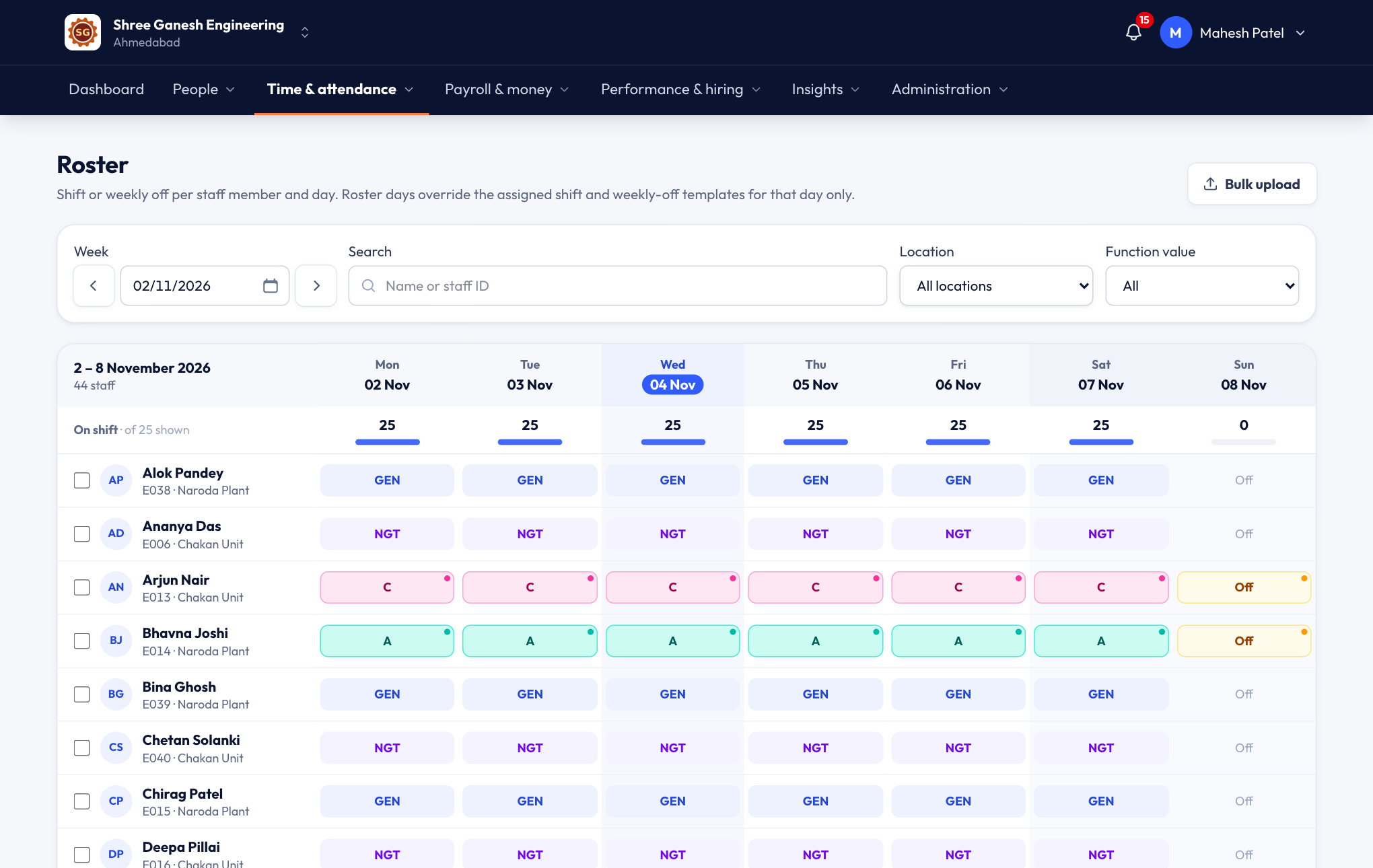
- Each row is a person and each column a day of the week. A cell shows the shift (from the template, or set on the roster) or the weekly off.
- Click a cell to Change it: pick a shift, a Weekly off, or Clear to go back to the templates.
- For someone on a rotational shift, choose which shift (A, B or C) they work each day.
- To change many people at once, tick them and use Set roster for selected staff, with a date range.
- Bulk upload takes a whole month from Excel.
Common cases
- Weekly-off swap. Someone works this Sunday and takes Wednesday off: set Sunday to their shift and Wednesday to Weekly off.
- One night shift. Set that day to the night shift; their late marks and overtime follow the night shift's times that day.
- A new rotation each week. Set the A/B/C shifts for the coming weeks in one go with Set roster for selected staff.
Where shifts show up
- The daily sheet shows each person's shift for the day, and can group by shift.
- The dashboard's Shifts today card shows who is in on each shift and who hasn't come yet. See The dashboard.